
Audio Mix Playground
Reviews
Description
Core Concept
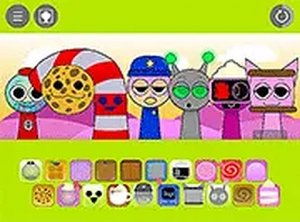
Audio Mix Playground turns music composition into a visual and tactile experience. Instead of reading notes or adjusting sliders, you select from a collection of characters, each tied to a specific sound. Placing a character on the central stage triggers its audio element, whether a steady beat, a flowing melody, or a supporting harmony. The stage acts like a mixing board where every addition changes the overall texture. This approach removes technical barriers, letting anyone experiment with sound arrangement through simple drag-and-drop actions.
Character Sound Library
The game includes a varied set of characters, each representing a different audio component. Some produce rhythmic patterns, others generate melodic lines, and a few add ambient layers. The exact number of characters is not fixed, but the selection encourages mixing and matching to create diverse compositions. Because each character contributes a distinct element, even small changes can shift the mood from energetic to calm. The library is designed to support both simple loops and more complex arrangements, depending on how many characters you choose to combine.
Open-Ended Play Style
Audio Mix Playground deliberately avoids traditional game structures like levels, scores, or time limits. The only objective is to enjoy the process of building a soundscape. You can start with a single character, listen to its contribution, then gradually add others. If a combination does not work, you remove or swap characters instantly. This freedom makes the experience suitable for casual exploration or focused experimentation. The game does not judge your choices, so you can try unusual pairings without penalty.
Controls and Accessibility
The interface works with mouse clicks on desktop computers and touch gestures on mobile devices. Dragging characters onto the stage is straightforward, and the game provides immediate audio feedback for every action. A full screen option helps you concentrate on your mix by removing distractions. No downloads or installations are required since everything runs in a standard web browser. This design ensures that anyone with an internet connection can start creating sounds within seconds.







Player Comments
Sign in to comment
You must be logged in before posting a review or rating.
No account? Create one
No comments yet. Be the first to comment!