OuterShoot Space Shooting Arcade

OuterShoot Space Shooting Arcade

Classic Space
Developer: Soul Edge Digital
Published: 2025-03-21
Updated: 2026-06-12

Reviews

OuterShoot offers a clean arcade experience with responsive controls and gradual difficulty. The normal mode is accessible for beginners, while hard mode provides a meaningful challenge. Its browser-based design means no setup, and full screen mode improves immersion. The game is ideal for short sessions and encourages repeated attempts to improve your score. Overall, it is a well-designed space shooter that respects your time.

Description

Game Introduction

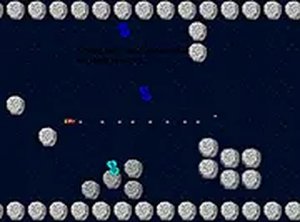
OuterShoot is an exciting space shooting game that places you in the cockpit of a spaceship. Your mission is to move forward and survive by navigating through a series of space obstacles. The game challenges your reflexes and strategic thinking as the difficulty increases. For players seeking a greater challenge, a hard mode becomes available at the end. Designed exclusively for desktop computers, OuterShoot provides a smooth experience with keyboard and mouse controls. It is completely free to play and runs directly in your browser, with no downloads or installations required. You can also switch to full screen mode for a more immersive adventure. Whether you are a casual player or a space game enthusiast, OuterShoot offers engaging gameplay that encourages repeated play.

How to Play

To play OuterShoot, use your keyboard or mouse to control the spaceship. The main objective is to move forward and avoid obstacles. As you progress, the game becomes more challenging. At the end, you can try hard mode for an extra test of skill. The game is designed for desktop computers, so ensure you are using a keyboard or mouse for the best experience. You can also switch to full screen mode for a more immersive feel. Just launch the game, and you are ready to go. No downloads or installations are needed.

Game Features

Game features include free access with no hidden costs. It is desktop only, ensuring optimized controls. Full screen mode enhances the visual experience. A hard mode challenge offers additional difficulty for skilled players. The game requires no registration or downloads, making it easy to start playing immediately.

Tips for Success

You will enjoy OuterShoot for its straightforward gameplay and increasing difficulty. It provides a satisfying test of reflexes without complex rules. The hard mode adds replay value for those who master the normal levels.

Compatibility

▸ Desktop: Chrome / Edge / Firefox / Safari
▸ Mobile: iOS Safari / Android Chrome
▸ Tablet: iPadOS Safari / Android Tablet Browser
Keep your browser updated for the best experience
Faq
Is OuterShoot available on mobile devices?
OuterShoot is designed exclusively for desktop computers and is not optimized for mobile devices. For the best experience, use a keyboard and mouse on a desktop or laptop.
Do I need to create an account to play OuterShoot?
No, OuterShoot requires no registration or account creation. You can simply launch the game in your browser and start playing immediately.
Can I play OuterShoot offline?
OuterShoot runs directly in your browser and requires an internet connection to load. Once loaded, some games may continue offline, but for reliable access, an internet connection is recommended.
Is OuterShoot free to play, or are there in-app purchases?
OuterShoot is completely free to play with no hidden costs or in-app purchases. All features, including hard mode, are accessible without any payment.
How do I switch to full screen mode in OuterShoot?
You can switch to full screen mode by using the full screen button typically located in the game interface or by pressing a designated key (often F11 on most browsers). This provides a more immersive experience.
What happens when I complete the normal mode in OuterShoot?
After completing the normal mode, a hard mode becomes available. This mode offers increased difficulty and provides an extra challenge for players who have mastered the standard gameplay.
Advertisement