Quest 21 Card Matching Puzzle

Quest 21 Card Matching Puzzle

Classic Puzzle
Developer: High Pixel Creations
Published: 2024-06-06
Updated: 2026-06-12

Reviews

Quest 21 is a straightforward card matching puzzle that relies on speed and basic addition. The timed rounds create a gentle pressure that makes each play feel purposeful. Controls are responsive on both desktop and mobile. The game offers good replayability as you try to beat your own score. It is a solid choice for casual puzzle fans who enjoy quick mental challenges without complex rules.

Description

Game Introduction

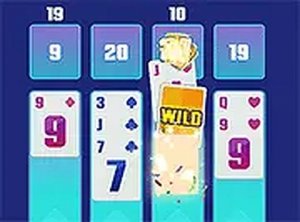
Quest 21 is a card matching puzzle game that tests your speed and mental math. The goal is to combine the values of cards displayed on screen to reach a total of 21. Each card shows a number, and you must drag and drop them into designated slots. The game includes a timer that adds urgency, pushing you to make quick decisions. It is designed for players of all ages and runs directly in your browser with no downloads. The simple concept makes it easy to start, while the timed element keeps each round fresh and challenging. Whether you have a few minutes or want a longer session, Quest 21 offers a clean, focused puzzle experience.

How to Play

To play Quest 21, look at the cards shown on the screen. Each card has a number. Your task is to drag and drop cards into the slots to combine their values and make a total of 21. Use your mouse on a desktop or your finger on a touchscreen device. The game has a timer, so you must work quickly to match as many cards as possible before time runs out. Correct matches earn points. The interface is intuitive, so you can learn the rules in seconds. Beginners will find it easy to pick up, while experienced players can focus on improving their speed and accuracy.

Game Features

Drag-and-drop card matching controls. Timed gameplay that adds challenge. Free to play with no hidden costs. Full screen mode for immersive play. Compatible with desktop and mobile browsers. No downloads or installations required.

Tips for Success

Focus on quick mental addition to identify card combinations that sum to 21. Practice regularly to improve your speed and accuracy. Prioritize matching cards with higher values first, as they may be harder to combine later. Stay calm under the timer to avoid mistakes. Use the drag-and-drop controls efficiently by planning your moves before picking up a card. With consistent practice, you can achieve higher scores and enjoy a more rewarding puzzle experience.

✅ Compatibility & Testing

• Desktop (Windows 11, macOS Ventura)
• Mobile (iPhone 14, Samsung Galaxy S23)
• Tablet (iPad Pro, Android tablet)
✅Supported browsers: Chrome, Safari, Edge, Firefox (latest versions)
❌ Not supported: Internet Explorer, older browser versions
Faq
Is Quest 21 free to play?
Yes, Quest 21 is free to play with no hidden costs. You can enjoy the full game without any payments or subscriptions. It runs directly in your browser, so there are no downloads or installations required.
Can I play Quest 21 on my mobile device?
Yes, Quest 21 is compatible with both desktop and mobile browsers. On a touchscreen device, you can use your finger to drag and drop cards, making it easy to play on smartphones and tablets.
Does Quest 21 have different difficulty levels?
The game includes a timer that adds urgency, which naturally increases the challenge as you try to beat your own score. While specific difficulty levels are not mentioned, the timed element provides a progressive challenge for players of all skill levels.
What happens when the timer runs out in Quest 21?
When the timer runs out, the round ends. Your score is based on the number of correct matches you made during that time. You can then start a new round to try to improve your score.
Do I need to create an account to play Quest 21?
No account is needed. Quest 21 is designed to be played instantly in your browser with no registration or login required. Simply open the game and start playing.
Can I play Quest 21 offline?
Quest 21 is an online game that runs in your browser, so an internet connection is required to play. It does not support offline play as it is hosted on a web server.
Advertisement