
Melody Maker Studio
Reviews
Description
Game Introduction
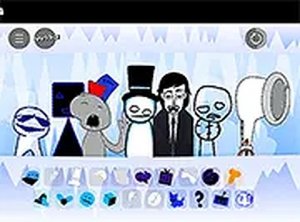
Melody Maker Studio is a browser-based music creation game that invites players to explore sound and rhythm through a set of interactive characters. Each character produces a unique and entertaining sound, allowing you to combine them to create your own beats and mixes. The game is designed to be accessible to everyone, from beginners to experienced music creators, with a vibrant and friendly atmosphere that encourages creativity and experimentation. Play it directly in your browser on any device, with no downloads needed, and enjoy hours of musical fun.
How to Play
To start playing Melody Maker Studio, visit the game page and launch it in your browser. You will see a set of characters, each with a distinct sound. Click or tap on a character to add their sound to your mix. Experiment with different combinations to create your own unique beats. The game is intuitive, so you can jump right in without any instructions. For a more immersive experience, use the full screen mode. Whether on a desktop or mobile device, the controls are easy to use. Keep trying new patterns and rhythms to discover all the fun sounds the game has to offer. There are no wrong moves in Melody Maker Studio, just endless possibilities for musical fun.
Game Features
Fun character sounds that make beat creation easy and enjoyable. The game is entirely browser-based, so there is no need to download or install anything. It supports both desktop and mobile devices, allowing you to play anywhere. A full screen mode is available for a more immersive experience. The simple and intuitive interface makes it suitable for players of all ages and skill levels.
Tips for Success
To get the most out of Melody Maker Studio, start by exploring each character individually to understand their unique sounds. Then, try combining different characters to discover interesting rhythms and melodies. Don't be afraid to experiment—there are no wrong moves, and the best mixes often come from unexpected combinations. Use the full screen mode to minimize distractions and focus on your creation. Finally, share your favorite beats with friends to inspire others and get feedback on your musical creations.







Player Comments
Sign in to comment
You must be logged in before posting a review or rating.
No account? Create one
No comments yet. Be the first to comment!