
Gem Block Puzzle Classic
Reviews
Description
Game Introduction
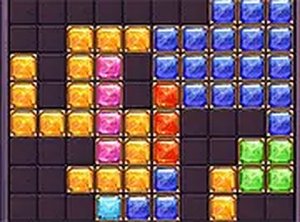
Gem Block Puzzle Classic is a free online puzzle game that combines classic block-stacking mechanics with a gem-collecting theme. Players arrange colorful block pieces onto a grid, aiming to complete full horizontal or vertical lines. Each cleared line removes the blocks and adds points to the score. The game is easy to learn but offers increasing challenge as the board fills. It provides a relaxing way to exercise logic and planning skills. The vibrant gem graphics make each session visually appealing. This game is designed for quick play sessions or longer strategic sessions. It is accessible to both new and experienced puzzle fans. The core loop of placing, clearing, and scoring keeps the experience fresh. No timers or pressure allow you to play at your own pace. Gem Block Puzzle Classic rewards careful thinking and spatial awareness. The gem theme adds a layer of visual satisfaction to each move.
How to Play
To play, drag and drop block pieces onto the game board. Each piece is a set of connected gem squares. The goal is to arrange them so they fill an entire row or column. When a line is complete, it disappears and you earn gem rewards. The game ends when no more pieces can be placed. Plan ahead to keep space open for larger pieces. Use your mouse to move and rotate blocks as needed. The more lines you clear at once, the higher your score. The game follows classic puzzle rules with a gem twist. You can replay to beat your own high score. Sharing your score with friends adds a social element.
Game Features
Relaxing yet strategic gameplay that trains your brain. Bright gem-themed graphics and smooth animations. Simple drag-and-drop controls for all ages. No time limit, so you can think carefully. Increasing difficulty as the board fills up. Free to play online with no downloads needed. The game is designed for both short breaks and extended play sessions. The gem theme provides a visually appealing experience.
Tips for Success
Focus on clearing lines in the center of the board to create more space. Try to keep the board balanced by placing pieces evenly. Plan a few moves ahead to avoid getting stuck. Practice regularly to improve your pattern recognition and spatial planning skills. Use the rotation feature to fit pieces in tight spots.




Player Comments
Sign in to comment
You must be logged in before posting a review or rating.
No account? Create one
No comments yet. Be the first to comment!