
Classic Retro Arcade Racer
Reviews
Description
Game Introduction
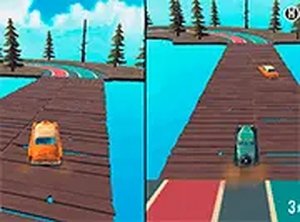
Classic Retro Arcade Racer is a browser-based driving game that captures the charm of 1960s car culture. Players can choose to race alone against computer-controlled opponents or team up with a friend for head-to-head competition on the same keyboard. The game features bright, colorful visuals and classic car designs that appeal to players of all ages. Coins earned from races can be spent in the in-game store to unlock new old-school vehicles, each with its own unique look. Tracks are lively and designed to keep every race exciting. As a free-to-play browser game, it requires no downloads and works best on desktop computers using keyboard or mouse controls. Whether you are a beginner or an experienced gamer, the simple mechanics and nostalgic atmosphere offer a welcoming experience for everyone.
How to Play
To start playing Classic Retro Arcade Racer, first select your preferred game mode from the main menu. In single player mode, you race against AI drivers. In two player mode, you and a friend compete on the same keyboard. Player one uses the arrow keys to steer, accelerate, and brake. Player two uses the WASD keys. Navigate corners carefully and avoid obstacles to keep your speed high. Coins collected during races can be spent in the in-game store to unlock new classic cars. The main goal is to cross the finish line first in each race. You can play in full screen mode for a more immersive view. The game runs smoothly in most modern browsers with no additional software required.
Game Features
Game features include retro 1960s-inspired visuals that create a fun and colorful atmosphere. Two game modes are available: single player against AI and local two player multiplayer on one keyboard. Players can unlock a variety of classic cars by spending coins earned in races. Simple keyboard controls make it easy for anyone to pick up and play. The game is free to play directly in a web browser with no downloads or installations needed.
Tips for Success
To succeed in Classic Retro Arcade Racer, focus on mastering the controls for smooth steering and braking. Collect as many coins as possible during races to unlock new cars, which may offer different handling. Practice cornering to maintain speed and avoid obstacles. In two player mode, communicate with your friend to anticipate each other's moves. Play regularly to improve your reaction times and learn track layouts. Use full screen mode for better visibility and fewer distractions.






Player Comments
Sign in to comment
You must be logged in before posting a review or rating.
No account? Create one
No comments yet. Be the first to comment!