
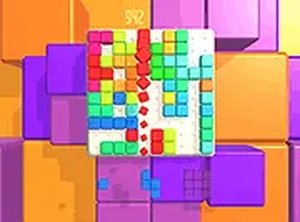
Blocks Webgl Puzzle Game
Reviews
Description
Game Introduction
Blocks Webgl is a puzzle game designed for relaxation. The core concept is simple: you are given a set of colorful blocks that must be placed onto a grid. Your goal is to fill entire rows or columns to clear them and earn points. There are no timers or complex rules, so you can play at your own pace. The game runs smoothly in any modern browser on a desktop computer, making it easy to start playing without any downloads. The clean and colorful interface keeps the focus on the puzzle-solving fun. Whether you have a few minutes or a longer break, Blocks Webgl provides a satisfying challenge that helps you unwind.
How to Play
How to play Blocks Webgl is straightforward. Use your mouse or keyboard to drag and drop the blocks onto the game board. You can rotate each block before placing it to find the best fit. The goal is to complete horizontal or vertical lines to make them disappear, which frees up space and increases your score. The game ends when no more blocks can be placed. There is no time limit, so you can think carefully about each move. For a more immersive experience, you can switch to full screen mode by clicking the full screen button in the game interface. Blocks Webgl is optimized for desktop use, so a keyboard and mouse give you the best control.
Game Features
Game features include relaxing puzzle gameplay that is free to play. The game offers a full screen mode for a more focused experience. It is optimized for desktop browsers, ensuring smooth performance. The controls are intuitive, allowing you to drag, drop, and rotate blocks with ease. There are no ads or interruptions during gameplay, so you can enjoy a peaceful session.
Tips for Success
You will like Blocks Webgl because it offers a calm and rewarding puzzle experience. The simple mechanics make it easy to pick up, while the strategic placement of blocks keeps your mind engaged. It is a great way to relax after a busy day without feeling rushed or pressured.




Player Comments
Sign in to comment
You must be logged in before posting a review or rating.
No account? Create one
No comments yet. Be the first to comment!